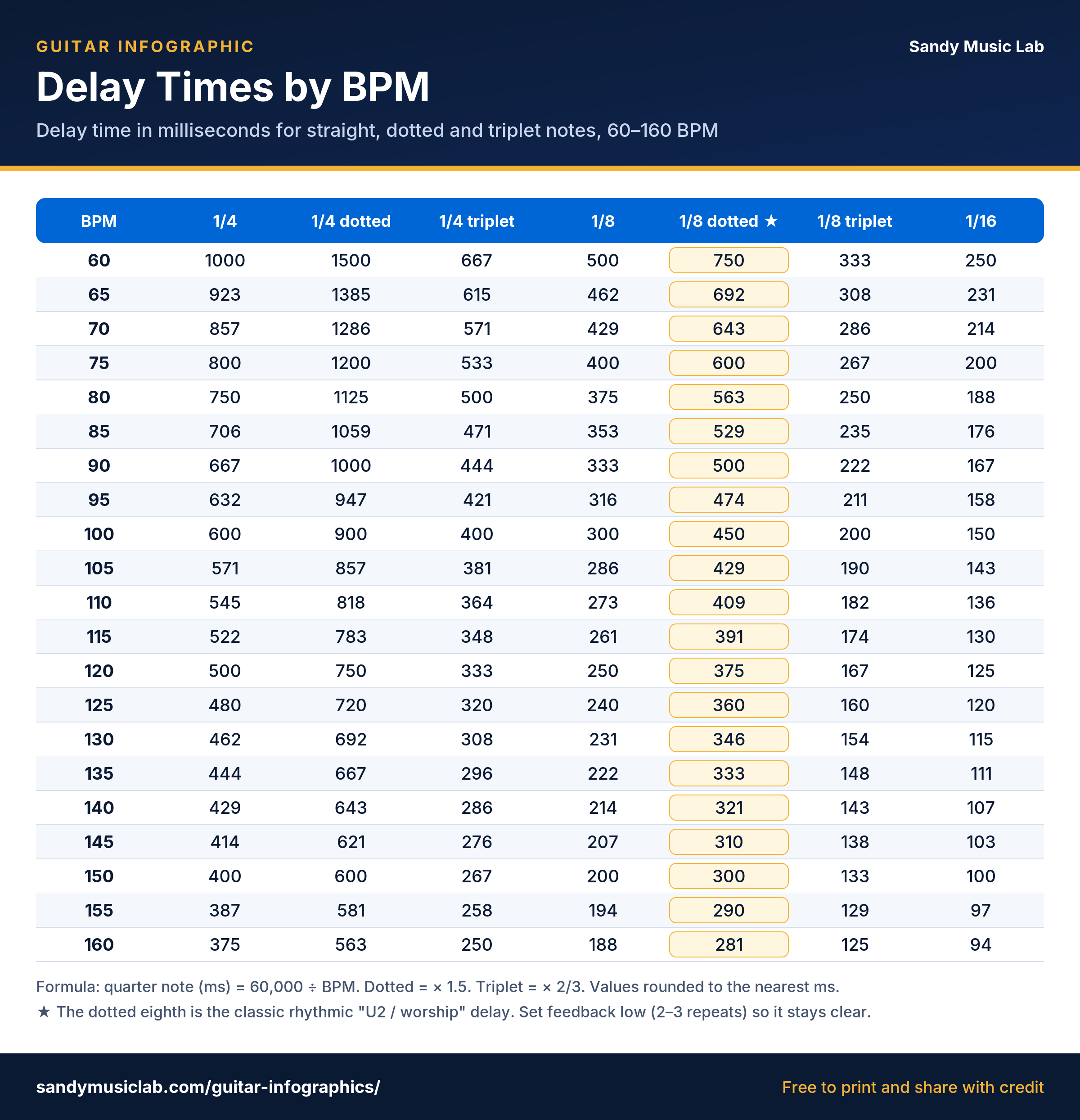
Quick answer: delay time in ms = 60,000 ÷ BPM for a quarter note. Halve it for an eighth note, multiply the eighth by 1.5 for a dotted eighth, and multiply any value by 2/3 for a triplet. At 120 BPM: 500 ms, 250 ms, 375 ms.
How to use the delay time calculator
- Type the song’s tempo, or tap the button (or press T) along with the beat.
- Find the note value you want in the table: straight, dotted or triplet.
- Set that number in milliseconds on your delay pedal, amp modeler or DAW plugin.
The BPM to ms formula
One beat (a quarter note) lasts 60,000 ÷ BPM milliseconds, because a minute has 60,000 ms. Every other value follows: a half note is ×2, an eighth is ×0.5, a sixteenth is ×0.25. A dotted note is ×1.5 and a triplet is ×2/3.
Worked example: The Edge-style dotted eighth at 128 BPM
60,000 ÷ 128 = 468.75 ms per beat. An eighth note is half that, 234.4 ms. Dotted eighth = 234.4 × 1.5 = 351.6 ms. Set the delay to about 352 ms, feedback 2–3 repeats, mix around 35–45%, then play straight eighth notes. The echoes fill the gaps and you get that cascading, rhythmic sound.
Delay times chart for common BPMs (ms)
| BPM | 1/4 | 1/8 | Dotted 1/8 | 1/8 triplet | 1/16 |
|---|---|---|---|---|---|
| 60 | 1000 | 500 | 750 | 333 | 250 |
| 70 | 857 | 429 | 643 | 286 | 214 |
| 80 | 750 | 375 | 562 | 250 | 188 |
| 90 | 667 | 333 | 500 | 222 | 167 |
| 100 | 600 | 300 | 450 | 200 | 150 |
| 110 | 545 | 273 | 409 | 182 | 136 |
| 120 | 500 | 250 | 375 | 167 | 125 |
| 128 | 469 | 234 | 352 | 156 | 117 |
| 140 | 429 | 214 | 321 | 143 | 107 |
| 160 | 375 | 188 | 281 | 125 | 94 |
Delay tips for guitar
- Dotted 1/8 for ambient and worship parts; a straight 1/4 for slap-back-free rhythmic echoes.
- Slapback is untimed: 80–140 ms, one repeat, for rockabilly and country.
- Keep the mix low on fast songs so the repeats don’t blur the riff.
- Program presets ahead with this chart if your pedal lacks tap tempo. See our best delay pedals and ambient worship guitar sound guides.
- Set reverb pre-delay in time (1/64 or 1/32) so it stays clear of your pick attack.