Quick answer: If you want a microphone tuner, playable chord charts and a metronome in one Chrome popup, Sandy Music Lab for Chrome is the one to try. GuitarApp still works if you only need one of those tools and don’t mind installing three extensions. Tune-by-ear extensions are useful as a pitch reference, but they can’t hear your strings. A clip-on tuner is still the better choice on a loud stage, and a phone app is still the better choice if you practice away from a computer.
A lot of guitar practice now happens next to a laptop: a tab of chords, a YouTube lesson, a metronome tucked in another window. Chrome extensions try to keep the tuner and the charts in the toolbar so you don’t have to hunt for them. I built one of the options in this comparison — the Sandy Music Lab extension — so I’ll say that up front, and I’ll also say where it is weaker than a clip-on, a phone app, or the full tools on this site.
This is a look at what you can actually install in Chrome today: all-in-one practice popups, split tool packs, and older tune-by-ear extensions. It is not a list of clip-on tuners. For hardware, see our guide to the best guitar tuners.
What a Chrome guitar tuner can and can’t do
A good extension should do three things quickly: hear a string (or play a reference tone), show a chord shape you can trust, and keep time. A few other points matter just as much once you use it every day:
- Microphone or by-ear only. If it can’t hear you, you’re matching a tone by ear. That’s a useful skill, and it’s a weaker tuner.
- One install or three. Some tools split the tuner, chords and metronome into separate extensions.
- Permissions and privacy. The tuner should ask for the mic only when you start it, and it shouldn’t need access to every site you visit.
- Desktop only. Chrome extensions do not install in Chrome on iPhone or Android. On a phone, use a phone app or the website tuner.
The main Chrome options in 2026
Sandy Music Lab for Chrome
This is the extension I made, based on the free tools on this site. It puts a microphone tuner, playable chord charts and a metronome in one popup. There is no account, no ads and no tracking, and it works offline. It asks for no special Chrome permissions. The first time you start the tuner, Chrome shows its own microphone prompt; the audio is analyzed on your computer and is never stored or sent anywhere.
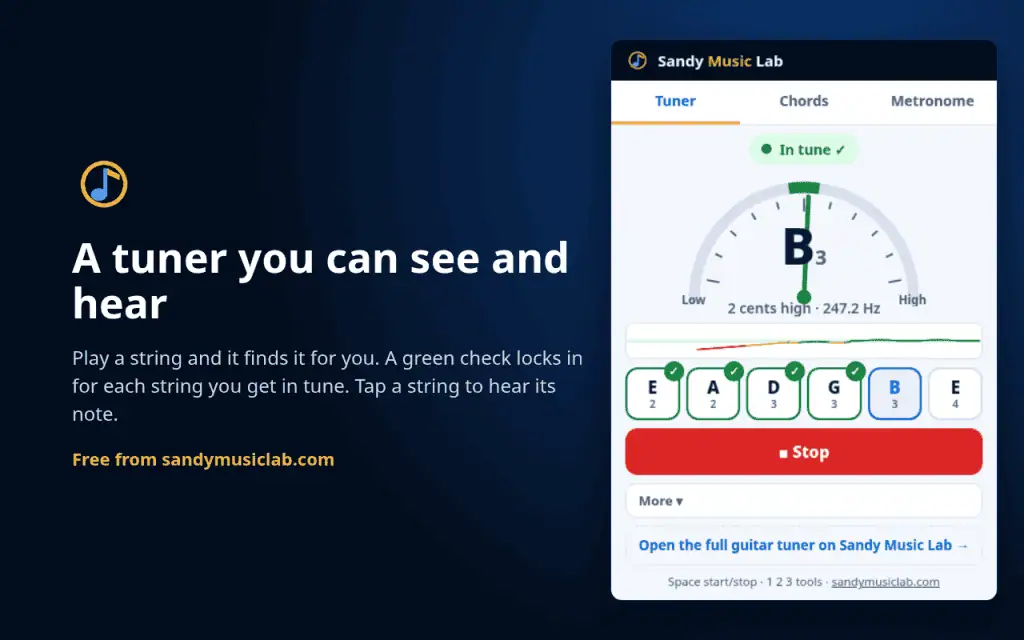
The tuner auto-detects which string you’re playing, shows a needle and a live pitch line, and checks off each string once it’s in tune. You can tap a string to hear the target note. It covers guitar, bass (4- and 5-string) and ukulele, with 15 tunings, including Drop D, half-step down, Open G, Open D, DADGAD and Drop C. You can also set A4 from 430 to 446 Hz.
The chord charts play when you tap them, either as a strum or note by note. Most chords have up to four shapes, with the starting fret marked. There are 15 chord types in all 12 keys, a type-in box for names like F#m7, left-handed charts, and a “chords that go with this one” row. The metronome runs from 30 to 260 BPM, with tap tempo, tappable accents, subdivisions and a speed trainer that raises the tempo every few bars.
Where it’s weaker: it only installs on a computer. The popup tuner does not include violin or some of the extra tunings on the full website tuner, which also has 30+ tunings and more instruments. And no browser tuner is as solid as a clip-on or a pedal tuner under stage lights and stage volume.
Sandy Music Lab on the Chrome Web Store · Free tools on this site
GuitarApp (tuner, chord chart and metronome as three extensions)
GuitarApp publishes three separate extensions: a microphone tuner, a chord chart, and a metronome. Ratings are high, though the review counts are small (a handful of reviews each, and user counts in the high hundreds to low thousands when I last checked). The tuner covers several instruments and more than 20 tunings. The chord chart has a large library and can play a chord or its notes. The metronome includes time signatures, accent patterns and tap tempo.
Where it’s weaker: you have to install three items to get the same three tools. The tuner doesn’t show a pitch-history line or lock a check on each string as you go. The metronome doesn’t offer subdivisions or a speed trainer. The listings I checked were last updated in January 2024, so it’s not clear how actively the set is maintained.
Tune-by-ear extensions
A few older Chrome extensions, including Guitar Tuner – Tune by Ear and a couple of abandoned “acoustic guitar tuner” listings, only play reference tones. They can be fine if you already tune by ear and want a pitch pipe in the toolbar.
Where they’re weaker: they can’t hear your strings, so they can’t tell you how far off you are or which way to turn a peg. Reviews of the tune-by-ear tools often ask for a needle, or report jumpy string switching and stale updates (some listings haven’t been touched since 2013 or 2014). If you want the extension to listen, skip this group.
Other practice extensions
Tools like PracticePal or Chord Lens are built for a different job: slowing down or reading chords on YouTube and similar sites. They can be useful for learning songs. They are not a substitute for a tuner and a metronome, and some need an account or a paid plan. I left them out of the table below for that reason.
Side-by-side
| What you get | Sandy Music Lab | GuitarApp | Tune-by-ear extensions |
|---|---|---|---|
| Microphone tuner | Yes, with a needle, pitch line and per-string check | Yes, in a separate tuner extension | No, reference tones only |
| Playable chord charts | Yes, several shapes, left-handed, chords in the key | Yes, in a separate chord extension | No |
| Metronome | Yes, with subdivisions and a speed trainer | Yes, in a separate metronome extension | No |
| Number of installs | One extension | Three extensions | One, but tuner only |
| Account, ads, tracking | None | Check each listing; the tools themselves are free | Varies; some listings are abandoned |
| Works offline | Yes | Yes, once installed | Usually yes |
| Best for | Practice in the toolbar, all three tools at once | People who only want one of the three tools | Players who already tune by ear |
When you should skip an extension
Use a clip-on or pedal tuner when you play live, or anywhere a room mic would pick up the drums, the amp, or someone else talking. A browser tuner is built for a quiet room and a computer that’s already open.
Use a phone app (GuitarTuna, Fender Tune, and similar) when you’re away from the computer. The Sandy Music Lab extension won’t install on a phone. The online tuner and chord finder on this site will run in a mobile browser, with no install.
Use the website tools when you want the larger tuner (more instruments and tunings), the full chord-finder fretboard, or calculators the extension doesn’t include, like the chord transposer and delay-time calculator.
How to try Sandy Music Lab for Chrome
Open the Chrome Web Store listing on a computer, click Add to Chrome, and pin it to the toolbar if you want it one click away. The first time you use the tuner, allow the microphone when Chrome asks. If you only want to try the tools in the browser, they’re free on the tools page with no extension at all.
FAQ
Is the Sandy Music Lab Chrome extension free?
Yes. There’s no account, no paid plan and no in-extension ads.
Does it work on a phone?
No. Chrome extensions install on desktop Chrome (and other Chromium desktops that support the Chrome Web Store). On a phone, use the online tuner and chord finder on this site, or a phone app.
Does the tuner send my audio anywhere?
No. The microphone starts only after you press Start tuner and allow it in Chrome’s prompt. Pitch is analyzed on your device. The extension doesn’t collect, store or transmit audio or personal data. The privacy policy is at sandymusiclab.com/chrome-extension-privacy.
How is the extension different from the tools on this site?
The extension is a fast popup for the three practice tools you reach for mid-session. The website tuner still has more instruments and tunings, and the site has extra tools the popup doesn’t try to copy, including the chord transposer, delay-time calculator, string-gauge finder and pedal-power calculator.
Should I still buy a clip-on tuner?
Yes, if you play live or practice in a noisy room. A clip-on reads the vibration of the headstock, so it isn’t thrown off by other sound in the room. An extension is for quiet practice at the computer.